Renew Books
That are currently checked out to you...
- Under the page title: My Library Account, click titles on loan.
- Mark the checkboxes for the titles you want to renew.
- Click the Renew all selected titles button..
Request Books
When the book you want is in any Duke Library...
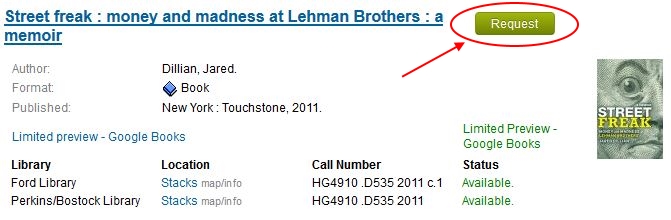
- Search the library catalog to locate the book.
- Click the green request button
 beside the title in the search results list.
 - Enter your Duke NetID and password if prompted.
- Click the bold blue "Request" link in the "GetIt@Duke" column beside the copy of the book you want.
- Change the pick-up library here (Fuqua users choose Ford Library) or the "last-needed date" and click the "Place Hold/Recall Request" button to enter your request.
Interlibrary Loan
Use when a book or article is not available at a Duke Library
- Search the library catalog first to find out if the book, or the journal containing your article is owned by Duke.
- If the book is owned by a Duke Library, follow the steps in the Request Books section on this page.
- If the book or journal is not owned by Duke, click the button below to login and request the book or article.
- NOTE: If you are a Fuqua student, faculty, or staff member, be sure to choose Ford Library as your home library.